Strategy
AI marketing for MSPs that already knows your business
An AI marketing assistant for UK MSPs that knows your brand, audience and offers. How Yori works, what it costs and why MSPs choose it.
Will Undrell10 min read
Share
An AI marketing assistant is only useful to an MSP if it already knows your services, your customers and your proof before you type a word. Yori is built that way. You set up your context once, then it drafts newsletters, emails, LinkedIn posts and sales assets from it for you to review. It costs from £49 a month after a free trial, and below we compare it with content libraries, marketing platforms and plain ChatGPT.
In Kaseya's 2026 State of the MSP Report, a survey of more than 1,000 MSPs worldwide, 71% said winning new customers was their top challenge. Nearly one in five (19%) said they struggle to show prospects their value quickly, almost double the year before. The survey is global rather than UK-specific, but few UK owners will find it unfamiliar.
More marketing is the obvious response. Making it sound like your MSP is the hard part.
Why ChatGPT on its own sounds like every other MSP
Ask a blank ChatGPT window to "write a LinkedIn post for our managed IT services" and it has very little to work with. It doesn't know which Microsoft 365 or security services you run, which sectors you serve, or what happened on your last onboarding.
So it fills the gaps with the most common language for the category. That is how you end up with "proactive support", "peace of mind" and "your trusted partner". Every MSP in the country can say those things, so they tell a prospect nothing.
The problem is missing context. Give ChatGPT a detailed brief, your service list and a real customer outcome, and it can write something specific. The catch is that you have to supply that context every time, keep it current, and remember which version you used last month.
Most busy owners don't. They type a short prompt, get a generic answer, edit for twenty minutes and decide AI "doesn't work for us".
What is overrated: volume. Ten generic posts a month do less for an MSP than two that mention a real service, a real customer problem and a clear next step.
What an AI marketing assistant for MSPs should actually do
Use this checklist on any tool, including Yori.
- Know your business before you start. Your services, positioning, tone and proof should be stored, not retyped.
- Know who you are writing for. An SMB finance director and an IT manager need different messages.
- Use your own evidence. Case studies, service descriptions and customer outcomes you have supplied, not invented ones.
- Follow your house rules. UK English, words you never use, offers you always mention.
- Guide the brief. A structured set of questions beats a blank box for anyone who isn't a prompt specialist.
- Give you an editable document. You should be able to change the draft directly, not copy and paste from a chat.
- Keep the work. Finished assets should be saved and reusable for the next campaign.
- Show what it did and what it cost. No black boxes, no surprise bills.
If a tool fails most of these, you are paying for a chat window.
How Yori works for an MSP
Yori is an AI marketing assistant built for the IT channel by Yori AI Limited, made in the UK. It draws on the marketing expertise of channel veterans with more than 25 years' experience, so its Services reflect how marketing really works for MSPs.
Set your context once
You add your MSP's details to the project, and Yori's context features keep them available for every chat and draft.
- Brand Profiles hold your positioning, services, voice and proof.
- Audiences describe who you sell to, with their roles, challenges and goals.
- Rules set standing instructions, such as UK English or always mentioning a current offer.
- Memory saves useful facts and preferences from your chats for later work.
You can also upload files, such as case studies, service sheets or old newsletters, and reference them in a chat.
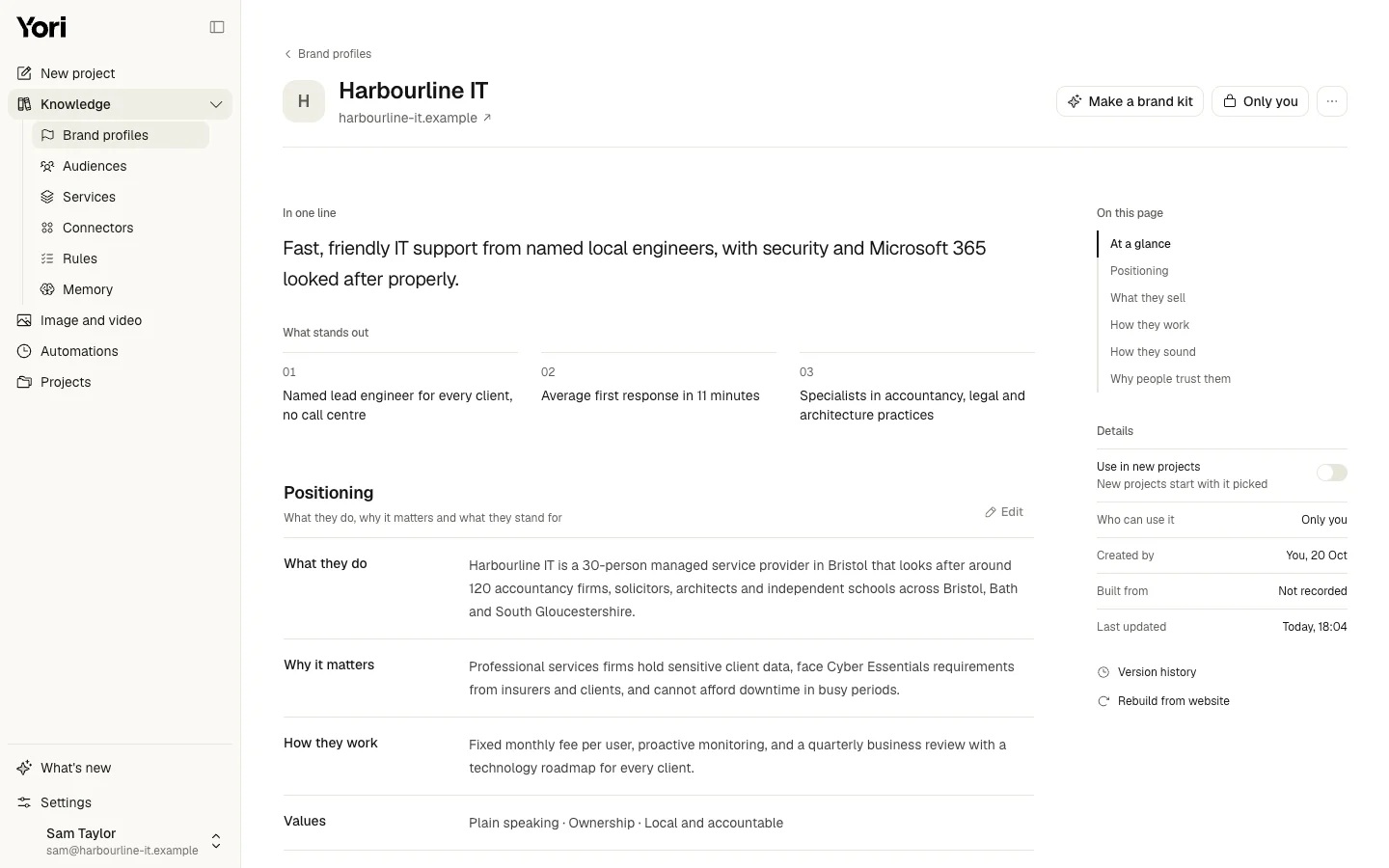
A brand profile for Harbourline IT, an example MSP made up for this article.
Run a guided Service
Yori Services are ready-made workflows. Each one asks the questions needed for a proper brief, drafts the asset and saves it to your project.
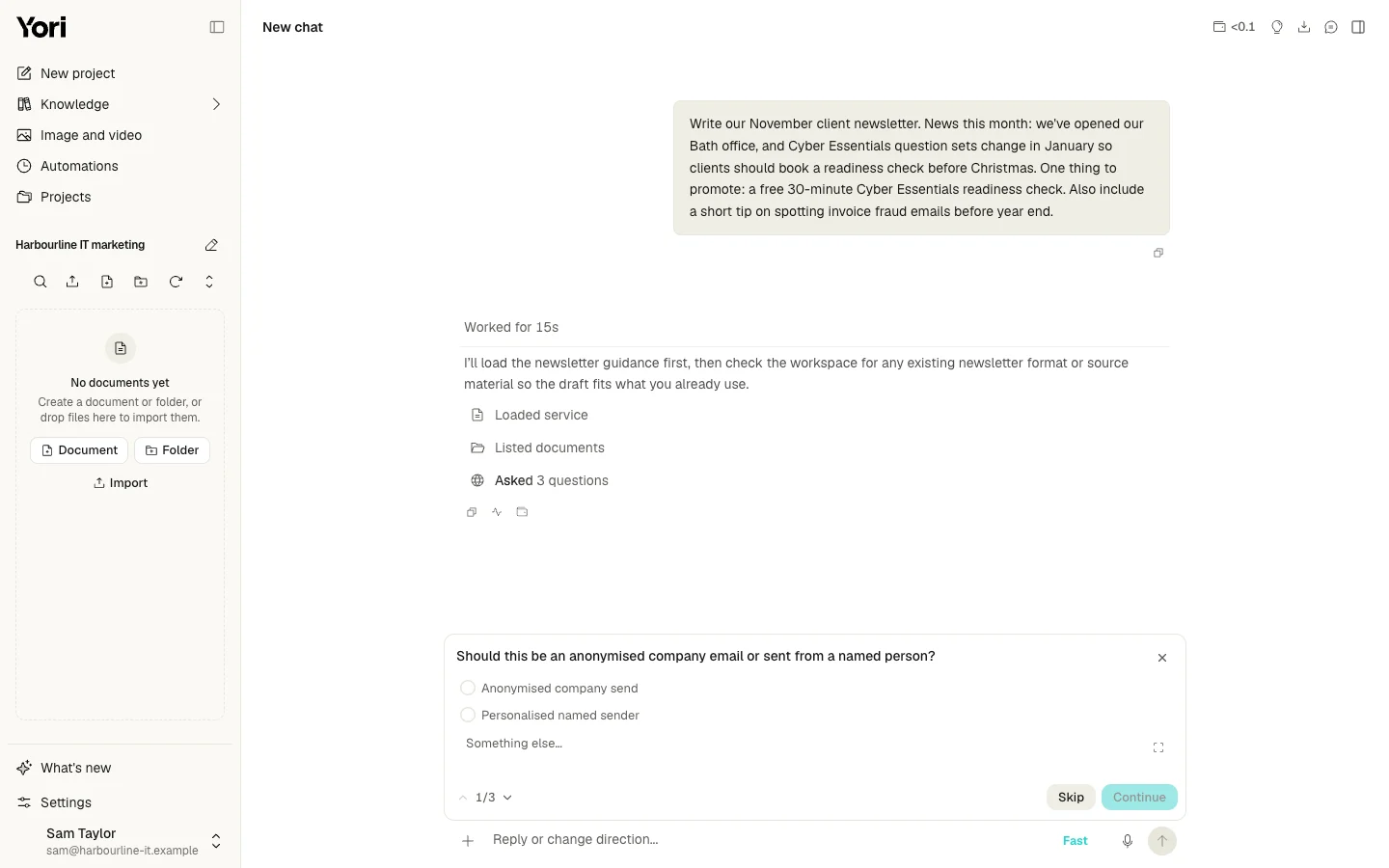
The Newsletter Service asking its brief questions before it writes anything.
Services include Newsletter, Email, Email Sequence, Social Post, Blog Post, Case Study, Battlecard, First Meeting Deck, Datasheet, Landing Page, Campaign Plan and Marketing Budget, among others.
Work in Chat and Canvas
Chat uses your brand profile, audience and supplied files. You can see each step it takes, such as reading a file or loading a Service.
Drafts appear in Canvas as editable documents. You change wording, cut sections or ask Yori to rework a paragraph, and the result stays in the project.
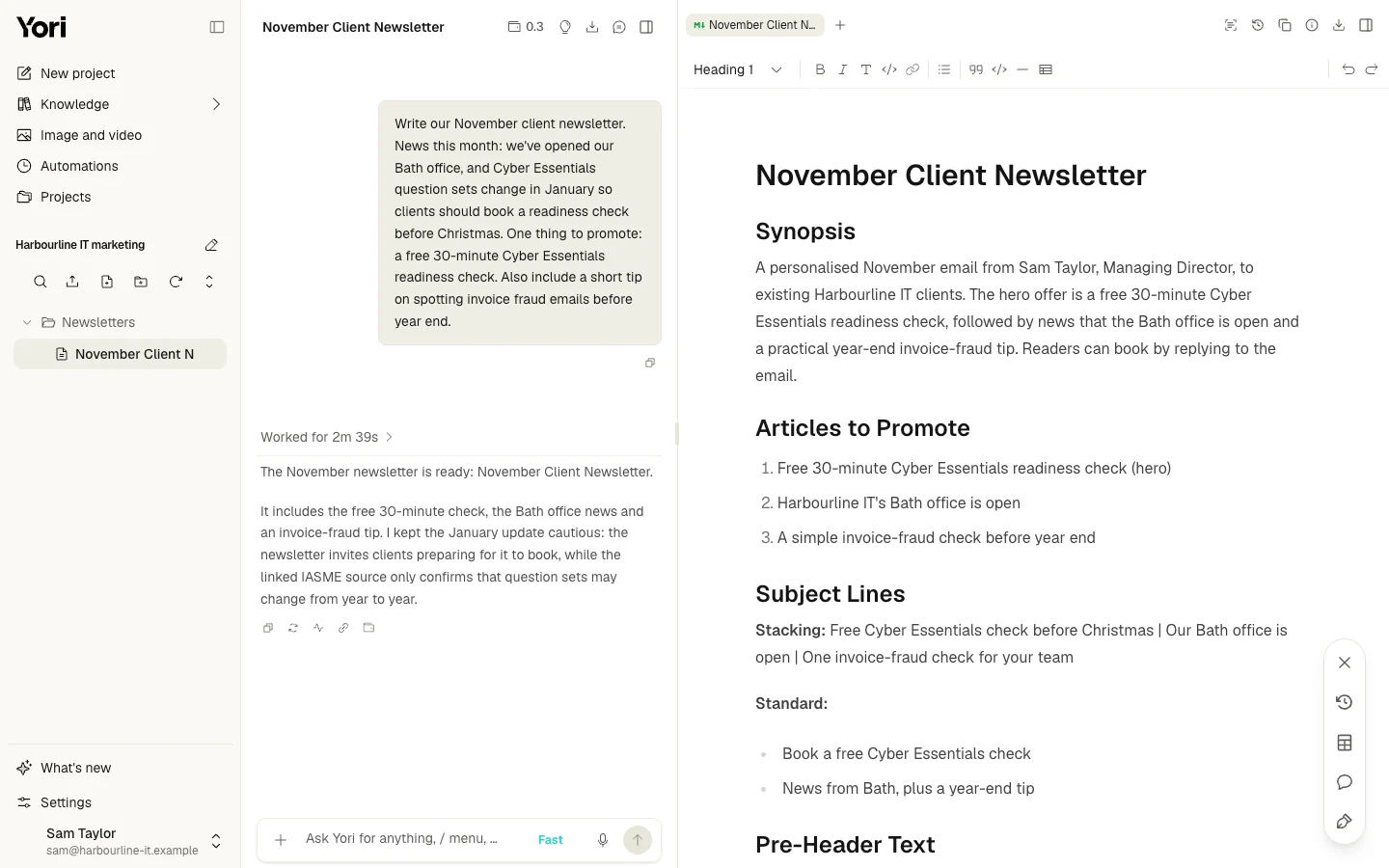
The finished newsletter draft in Canvas, saved to the project's Newsletters folder.
Connect the tools you already use
Connectors let Yori read context from, and deliver work into, the tools your MSP already runs on. That includes Microsoft Outlook, Teams, SharePoint, OneDrive and Excel, CRMs such as HubSpot, Salesforce, Dynamics 365 and Zoho, and Mailchimp for client newsletters, plus hundreds more apps. You choose which actions each connector is allowed to take.
Create images in the same place
Image generation sits inside Yori, so campaign visuals can be made alongside the copy.
Run work on a schedule
Automations run a task for you on a schedule and leave the result in a project chat. For example, Yori can draft the client newsletter on the first Monday of every month, ready for you to review.
See the cost of every answer
Every answer lists the credits it used, so you know what a piece of work costs as you go.
Illustrative example: one month of marketing for a 30-person MSP in Bristol
Picture a 30-person MSP in Bristol with no marketer. The owner handles marketing between client meetings, and most new business comes from referrals.
In the first session, the owner sets up a brand profile with the MSP's services and tone. They add an audience of local SMB owners and office managers, and upload a short case study and the current service sheet.
For the month, they plan four assets:
- Monthly client newsletter. The owner gives the Newsletter Service this month's news and the one thing to promote. The draft uses the MSP's own services and voice.
- Cyber Essentials readiness email. The Email Service builds a message for clients who haven't yet started certification, drawing on the uploaded service sheet.
- Case study. The Case Study Service turns the uploaded customer story into a write-up for the website.
- Two LinkedIn posts. The Social Post Service writes one from the case study and one from the Cyber Essentials email, so each idea is used twice.
Each draft opens in Canvas. The owner edits it, checks every claim and saves it. They then send the email from Outlook or Mailchimp and post to LinkedIn, either themselves or through Yori's LinkedIn connector.
Next month, the brand profile, audience and files are already there. The owner starts from the Service, not from scratch.
How Yori compares with other MSP marketing options
| Option | What you get | Who does the work | Published price | Best for |
|---|---|---|---|---|
| ChatGPT | General-purpose AI chat | You write the prompts and supply context | Free and paid plans (OpenAI pricing) | General-purpose drafting with prompts supplied by you |
| Gradient MSP Studio / Studio+ | Free MSP content library; Studio+ adds ready-made graphics, social posts, blogs and emails rebranded with your logo, plus scheduled publishing | Gradient's team produces it; your logo is applied automatically and posts can be scheduled | Studio: free. Studio+: see their site | MSPs looking at a pre-made social content and scheduling service |
| MSP Marketing Edge | Monthly done-for-you content library, sold to one MSP per area | Content is written for you | See their site | Monthly done-for-you content |
| Kaseya MSP Success Digital | Core, Express and Pro tiers covering AI discoverability, SEO, local search, campaign automation and ready-to-run campaigns | Platform plus expert-led execution | Price on request | Campaigns, SEO and local search support |
| Marketopia The Growth Machine | Platform with marketing concierge, CRM, template library, reputation management, mobile app and 70+ eLearning modules | Concierge support alongside your team | See their site | MSP marketing support with CRM and learning modules |
| Yori | AI assistant with persistent context, guided Services, editable documents, connectors, scheduled Automations and image generation | Yori drafts; you review and publish | Free trial; Pro £49/month; Business £129/month | MSPs who want marketing in their own voice without an agency |
Why MSPs choose Yori
Behind every Service is more than 25 years of channel marketing know-how. Yori keeps your brand, audience, rules and memory in the project, so context can be reused instead of re-entered for each prompt. Guided Services such as Newsletter, Email, Case Study and Social Post cover the marketing an MSP does every month. Drafts open as editable Canvas documents for your team to review.
For MSPs comparing general-purpose ChatGPT, Gradient's branded social content and scheduling, MSP Marketing Edge's monthly done-for-you content, Kaseya's campaign, SEO and local-search offer or Marketopia's marketing platform, Yori's distinction is a reusable MSP context paired with guided marketing workflows and editable drafts. It is built in the UK, every answer lists the credits used, and Pro starts at £49/month after the free trial. See Yori pricing.
What Yori costs
All plans are listed on the Yori pricing page.
- Free trial: 25 one-time credits, no card required, valid for one month.
- Pro: £49 per month, 25 monthly credits and up to three Personal Services per user.
- Business: £129 per month, 25 monthly credits, unlimited Personal Services, Organisation Services, workspace Rules and shared brand profiles.
- Top-ups: £1 per credit.
- Enterprise: custom-priced, for distributors and vendors running partner programmes.
You can see the full list of Yori Services and compare plans on the pricing page.
Frequently asked questions
Is Yori just ChatGPT with a wrapper?
Yori uses AI models too. The difference lies in what surrounds them: saved brand and audience context, guided Services, editable documents, connectors to your own tools, scheduled Automations and a project that keeps your work. Try the free one-month trial to see how saved context and guided workflows fit your MSP.
Will it sound like our MSP?
Drafts draw on your brand profile, voice settings, audience and files, so they start much closer to your business than a blank prompt does. How close depends on how specific your context is. You still edit every draft before it goes out.
What do we need to provide?
You supply your own business context: your services, the customers you serve, your tone and any proof you want used. Useful files include case studies, service sheets and past newsletters. Upload them, or connect SharePoint or OneDrive so Yori can read them where they already live. Yori works from what you give it, so check every claim before it goes out.
Does Yori work with Microsoft 365?
Yes. Connectors cover Outlook, Teams, SharePoint, OneDrive and Excel, so Yori can read your files and deliver drafts where your team already works.
Can Yori publish to LinkedIn for us?
Yes. Connect LinkedIn in Connectors and Yori can publish a finished post when you ask it to in chat. You choose which of the connector's actions Yori may use, so you can keep posting switched off until you're ready. You can also set up an Automation to draft next week's posts every Monday morning, ready for you to review.
How long before we see results?
Use the free one-month trial to create a draft from your own context, then judge its fit before choosing a paid plan. Outcomes depend on your offer, how consistently you publish and how your team follows up.
Written by Will Undrell
Yori is built with the marketing expertise of channel veterans with more than 25 years in the IT channel.

Do it in Yori
Use the Newsletter Service
Yori guides the brief, drafts it in your brand voice and saves it to your project.